What Are MCP Apps? Interactive UIs Inside AI Clients
What MCP Apps are, how they differ from MCP servers and web apps, and why interactive in-chat UIs are becoming a real category in 2026.
MCP Apps are interactive UIs that render inside AI hosts instead of sending users out to a separate website. The official MCP Apps overview now uses that exact category name and describes MCP Apps as interactive HTML interfaces that render directly in chat. OpenAI's current MCP Apps compatibility page for ChatGPT says ChatGPT supports the MCP Apps open standard for embedded app UIs too.
That matters because "MCP app" is no longer just loose builder shorthand. As of April 23, 2026, it is a real standards-level category: portable, in-chat, interactive interfaces that sit on top of MCP tools.
If you need the protocol foundation first, start with What Is MCP?. If your question is specifically about ChatGPT's product category, What Are ChatGPT Apps? is the better companion post.
The shortest useful definition
An MCP App is usually all of these at once:
- a tool-backed experience that lives inside the conversation
- an interactive HTML UI the host renders in place
- a secure bridge between the UI and the host
- a portable standard rather than a single-host one-off
The cleanest distinction is this:
| Term | What it is |
|---|---|
| MCP server | The backend protocol endpoint that exposes tools, resources, and prompts |
| MCP App | The interactive in-chat UI experience rendered by the host |
| Web app | A standalone site or product the user navigates to directly |
Not every MCP server is an app. Some servers only expose tools and return text or structured data. An MCP App is what you build when the experience needs a real interface inside the conversation.
Why this category matters now
The category got real because two things are now true at the same time:
- the official MCP docs have a first-class MCP Apps extension
- ChatGPT publicly supports the open standard for embedded MCP App UIs
OpenAI's current compatibility page says MCP Apps UIs run inside an iframe and
communicate with the host over a standard ui/* JSON-RPC bridge using
postMessage. It also recommends building around the standard first and only
using window.openai when you need ChatGPT-specific extensions.
That portability point is the big shift. The UI layer is no longer purely host-specific.
What makes something an MCP App
It renders inside the chat
The official MCP Apps overview says text responses only go so far and that MCP Apps let servers return interactive HTML interfaces such as dashboards, forms, and visualizations directly in chat.
If the experience is just a text answer or plain structured data, you may not need an app at all.
It combines a tool with a UI resource
The same official overview explains the core pattern clearly: a tool declares a reference to a UI resource, and the UI resource renders the interactive interface.
That is the architectural leap from "tool output" to "app experience."
It uses a host bridge instead of pretending to be a standalone site
The official MCP Apps docs describe a standard bridge:
- the tool points to
_meta.ui.resourceUri - the host fetches the UI resource
- the UI runs inside a sandboxed iframe
- the app and host communicate with
ui/*JSON-RPC messages overpostMessage
OpenAI's ChatGPT compatibility page says ChatGPT uses that same iframe and bridge model and recommends building around the shared standard surface first.
MCP App versus MCP server
This is the distinction most posts blur together.
| MCP server | MCP App |
|---|---|
| Exposes capabilities over protocol | Renders an interactive interface in the host |
| Can exist with no UI at all | Usually depends on one or more tools |
| Owns business logic and data access | Owns the user-facing in-chat interaction |
| Might return text, resources, or structured data only | Exists because text alone is not enough |
So when someone asks "are MCP Apps just MCP servers?", the right answer is:
No. A server is the protocol endpoint. An app is the interactive experience the host renders on top of that capability surface.
If you want the protocol-side internals, go to MCP Architecture Explained.
Why not just build a web app?
The official MCP Apps overview asks exactly this question and gives four strong reasons:
- context preservation
- bidirectional data flow
- integration with host capabilities
- security guarantees from sandboxing
Those are not minor UX details. They are the reason the category exists.
flowchart LR
  subgraph web["Standalone web app"]
    a["User leaves chat"] --> b["Open new tab or URL"] --> c["Recreate context"]
  end

  subgraph mcp["MCP App"]
    d["User asks in chat"] --> e["Host renders UI inline"] --> f["Continue in same conversation"]
  end
If the experience does not benefit from staying inside the conversation, a normal web app may still be simpler. But if the conversation is the workflow, MCP Apps are a much better fit.
How MCP Apps work
The official MCP Apps overview describes the flow like this:
- the tool advertises a UI resource
- the host can preload that resource
- the host fetches and renders the UI in a sandboxed iframe
- the app and host communicate over a
ui/*JSON-RPC bridge - the app can call tools and receive fresh results
OpenAI's
ChatGPT compatibility page
adds an important implementation detail: ChatGPT supports the same standard
bridge, and you should only reach for window.openai when you need a
ChatGPT-specific extension like checkout, file upload, or host modals.
That is the right build order:
- standard MCP Apps keys and bridge first
- host-specific extensions second
A concrete example
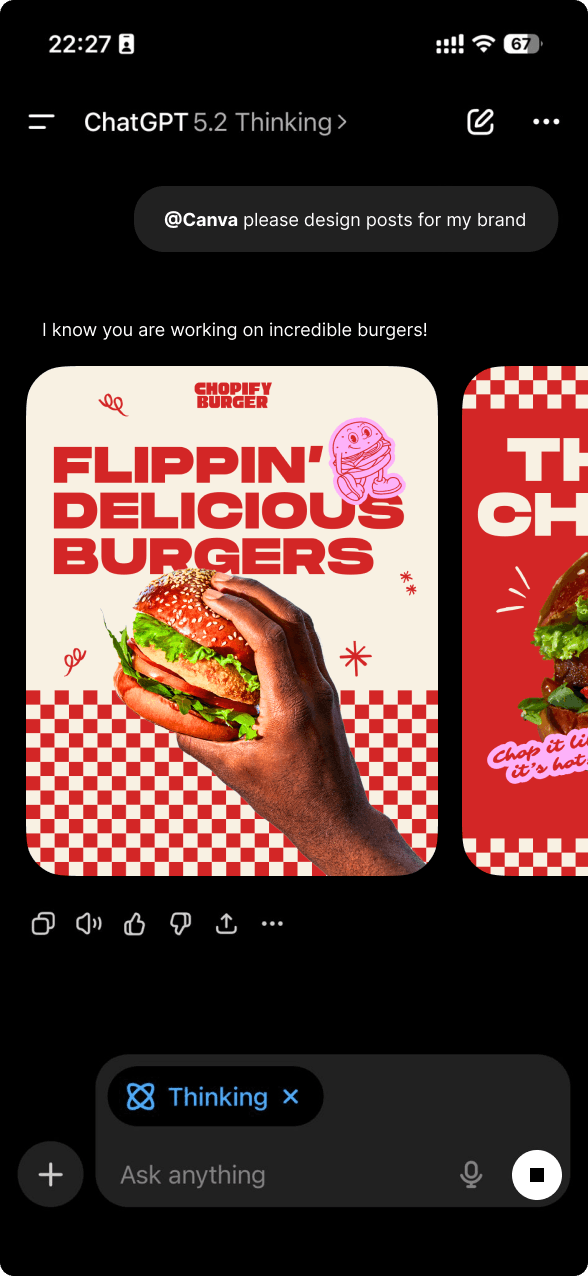
A product-search MCP App is a good example because plain text is clearly not enough.
The user asks for "running shoes under $150." The model decides to call the search tool. The host renders a product grid or carousel inline. The user can compare options without leaving the conversation. If the host and app support it, the UI can trigger follow-up tool calls directly from the rendered interface.
That is not just a nicer tool result. It is an app-like interaction loop inside chat.
For more examples and UI design guidance, go to Building MCP Tools with Rich UIs.
Good use cases for MCP Apps
MCP Apps shine when the user needs to interact with data, not just read about it.
Good fits:
- product search and comparison
- dashboards and visualizations
- booking and reservation flows
- multi-step forms
- approvals and review workflows
Poor fits:
- simple one-line lookups
- purely static reference answers
- tasks where the user should really be in your full product anyway
Where MCP Apps fit relative to ChatGPT apps
An MCP App and a ChatGPT app are related, but not identical terms.
An MCP App is the standards-level UI pattern. A ChatGPT app is the ChatGPT-facing product packaging around a connected capability. Sometimes a ChatGPT app uses an MCP App UI directly. Sometimes it layers ChatGPT-specific metadata, auth, or distribution concerns on top.
That is why these two posts exist separately:
- What Are MCP Apps? defines the portable UI standard
- What Are ChatGPT Apps? explains the current ChatGPT product category
How drio fits
drio is for teams that want to build the app layer without hand-writing every protocol detail.
You connect the underlying API or capability, shape the tool output, map it to widgets, and ship an in-chat experience that follows the MCP model instead of building a one-off proprietary embed.
If you want the no-code build path, go to Build AI Apps Without Code. If you want the host landscape after that, MCP client comparison is the right follow-up.
Summary
MCP Apps are interactive UIs that render inside AI hosts and communicate with the host over a standard bridge. They are not the same thing as MCP servers. The server exposes capabilities; the app is the in-chat interface built on top of them.
As of April 23, 2026, this is a real standards-level category, not just loose marketing language. The official MCP docs define MCP Apps, and OpenAI says ChatGPT supports the open standard for embedded MCP App UIs.
FAQ
Are MCP Apps the same as MCP servers?
No. The server is the backend protocol endpoint. The app is the interactive UI rendered by the host.
Do MCP Apps only work in ChatGPT?
No. MCP Apps are a standard. ChatGPT supports them, but the category is not ChatGPT-only.
When should I build an MCP App instead of returning text?
Build one when the user needs to inspect, compare, edit, confirm, or otherwise interact with data in a real UI.
When should I build a normal web app instead?
Build a normal web app when the workflow does not benefit from staying inside the conversation, or when the full product surface is too large for an in-chat UI.
What should I read next?
Read MCP Architecture Explained for the protocol internals or Building MCP Tools with Rich UIs for the design and implementation side.
If you want to build one instead of just naming the category, start with Build AI Apps Without Code and then decide which hosts matter with MCP client comparison.
Get the Builder Brief
Weekly tactical notes on shipping ChatGPT apps, MCP integrations, and product-led distribution.