What Are ChatGPT Apps? A Complete Guide for 2026
What ChatGPT apps are in 2026, how they relate to GPTs and MCP, and what OpenAI means by apps, connected apps, and custom apps today.
ChatGPT apps are the current umbrella term for connected capabilities inside
ChatGPT. Some apps add rich in-chat UI. Some search across external services.
Some let ChatGPT take actions after you confirm them. In OpenAI's current
language, the older term connectors was renamed to apps on December 17,
2025, which is why older screenshots and setup guides still sound slightly off
today.
The simplest way to keep the category straight is this: an app is the thing a user connects and uses inside ChatGPT, a connected app is that app after auth or enablement, and an MCP server is usually the tool-and-data layer behind the experience. If you keep those layers separate, the rest of the terminology gets much easier.
The shortest useful definition
If you only need the practical answer, start here:
- A ChatGPT app is an external capability available inside ChatGPT.
- A connected app is an app that has already been enabled on your account or workspace.
- A custom app is one you or your workspace build and connect yourself.
- An MCP server is usually the backend ChatGPT talks to for tools, data, and actions.
- A GPT is still a separate thing: a customized version of ChatGPT that can use apps, but is not itself the same as an app.
OpenAI's current Apps in ChatGPT help page describes apps as the way to bring tools and data into ChatGPT so you can search, reference, and work without leaving the conversation. That same page breaks the category into a few capability types:
- interactive apps
- search apps
- deep research apps
- sync-enabled apps
- write-action apps
That matters because "ChatGPT app" is not one narrow format. It is the current umbrella for several ways ChatGPT can work with outside systems.
How the category got here
The naming got confusing because OpenAI's tool story changed in stages.
| Era | What it meant | What matters now |
|---|---|---|
| Plugins | Early third-party tool integrations in ChatGPT | Useful as historical context, but not the current system |
| GPTs | Customized versions of ChatGPT with instructions, files, capabilities, and optional integrations | Still current |
| Apps | The current connected runtime inside ChatGPT, including directory apps and custom apps | The current category term |
The current milestones are clearer than they were a few months ago:
- OpenAI introduced apps in ChatGPT on October 6, 2025.
- OpenAI opened app submissions for review and publication in ChatGPT on December 17, 2025.
- OpenAI's Help Center says that on December 17, 2025,
connectorswere renamed toappsto create a single connected-app experience inside ChatGPT.
That is why older posts that talk about plugins, GPT actions, connectors, and apps often sound half-right at the same time. They were written against different moments in the product timeline.
If you want the deeper comparison across generations, read ChatGPT Plugins vs Custom GPTs.
Where GPTs fit now
GPTs still exist and still matter.
OpenAI's current Creating and editing GPTs article says a GPT can include instructions, conversation starters, uploaded knowledge, selected capabilities, apps, and actions. It also makes one important product distinction explicit: a GPT can use either apps or actions, but not both at the same time.
That gives you a cleaner mental model:
- a GPT is a customized assistant
- an app is a connected external capability
Sometimes they work together. A GPT can rely on apps. But they are still different layers.
If your goal is a specialized assistant with prompt instructions and a few reference files, a GPT may be enough. If your goal is live external data, structured actions, or a richer in-chat UI, you are usually talking about apps.
What apps look like inside ChatGPT today
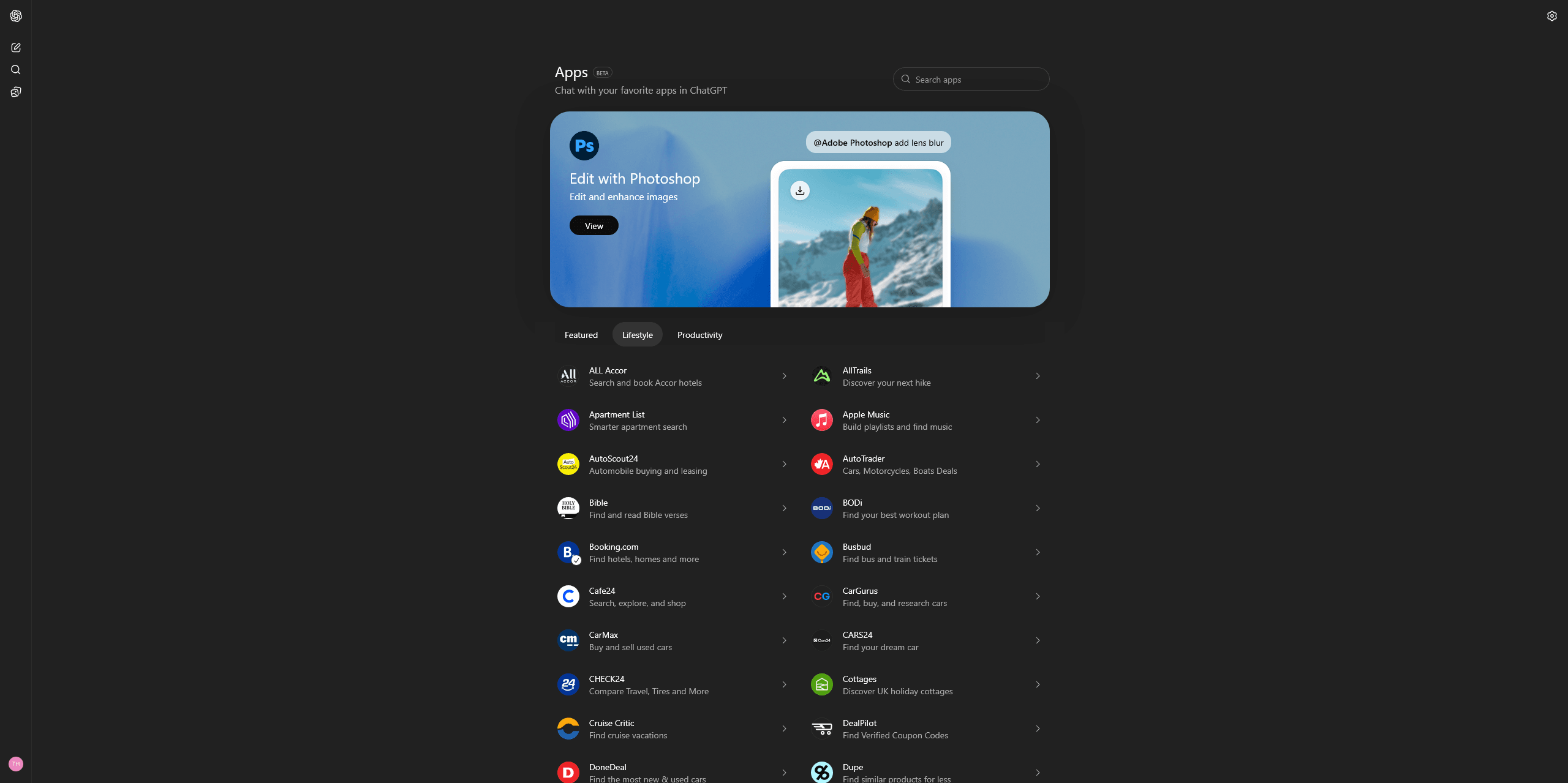
The current user flow is simpler than a lot of old blog posts make it sound.
OpenAI's Apps in ChatGPT help
page says users browse apps from
Settings -> Apps, where the app directory and app pages live. That same help
surface also notes that Business and Enterprise or Edu users can see
workspace-specific app views there, and that Connect can be unavailable
because of plan, geo, or workspace policy. Once an app is available for your
account, you connect it, complete auth if needed, and then use it in chat.
After that, apps can usually be invoked by:
- selecting them from the tools flow
- using an
@mention in chat - accepting a relevant app suggestion from ChatGPT
OpenAI's current apps feature page shows that positioning clearly. Examples like Stripe, Gusto, Vercel, Canva, Replit, TurboTax, and DoorDash are all framed as "ask in language, get back a real result or action path."
The distinction most guides blur together
This is the part readers usually need most:
| Term | What it means in practice |
|---|---|
| App | The user-facing experience in ChatGPT, including metadata, permissions, auth state, and often UI |
| Connected app | An app that has already been enabled for a user or workspace |
| Custom app | An app you or your company connect yourselves rather than installing from the public directory |
| MCP server | The protocol-facing backend that exposes tools, data, and actions |
The official language supports that split.
OpenAI's help docs say you can build your own custom app using MCP, and that the Apps SDK is the recommended way to package and publish app experiences. OpenAI's Apps SDK launch post says the Apps SDK is built on the Model Context Protocol. And the MCP Apps compatibility in ChatGPT docs say ChatGPT supports MCP Apps UIs and the standard iframe-and-bridge model for embedded app interfaces.
So when someone asks, "Are ChatGPT apps just MCP servers?" the best short answer is:
Usually not. Modern ChatGPT apps are often MCP-backed, but the app is the broader user-facing package around the protocol layer.
If you want the protocol-side explanation first, start with What Is MCP?.
How MCP fits into ChatGPT now
MCP is not the label most users click. It is the underlying standard that makes custom tool and UI connections portable.
OpenAI's Apps SDK launch post says the Apps SDK builds on MCP. OpenAI's connect guide for ChatGPT and its developer mode guide both frame the current custom-app workflow around MCP-backed apps. And the MCP Apps compatibility page goes one step further by saying you can build a portable app UI once and run it in ChatGPT and other MCP Apps-compatible hosts.
If your next question is whether ChatGPT is the only client that matters, MCP client comparison is the better follow-up than stretching this overview page into a broader host comparison.
That is the most useful mental model:
- MCP is the interoperability layer
- the app is the ChatGPT-facing product layer
- developer mode and app submission are how you test and distribute custom apps
If your question is more practical than conceptual, How to Add MCP Tools to ChatGPT is the step-by-step setup post.
OpenAI-built apps and custom MCP apps are not the same thing
This is another place where "apps" gets overloaded.
OpenAI's current beta guidance for developer mode treats OpenAI-built apps and custom MCP apps as different paths. The safe mental model is:
- OpenAI-built apps are the managed app experiences users connect from the directory.
- Custom MCP apps are the path for your own remote server, your own auth, and your own tool definitions.
- If you need write or modify actions in ChatGPT, OpenAI's current beta docs point you to the custom MCP path rather than the built-in app path.
That matters because "Can ChatGPT use apps?" and "Can my company ship a write-capable custom app?" are not the same question.
If your next question is setup
If you already understand the category and just want the connection flow, go
straight to How to Add MCP Tools to
ChatGPT. If you are trying to map the
developer docs themselves, OpenAI Apps SDK
Guide is the better follow-up because it explains
the /mcp endpoint, developer mode, and current ChatGPT-specific requirements
without turning this overview into a setup manual.
What is current as of May 7, 2026
This is the part worth keeping date-stamped, because it changes faster than the general definition.
As of May 7, 2026:
- OpenAI's launch post for apps in ChatGPT says the app experience launched on October 6, 2025 and originally rolled out to logged-in users outside the EEA, Switzerland, and the UK on Free, Go, Plus, and Pro plans, with Business, Enterprise, and Edu added later in preview.
- OpenAI's Apps in ChatGPT help
page, updated yesterday, says
the app directory lives under
Settings -> Apps, and that app availability still depends on plan, geography, and workspace settings. - OpenAI's Creating and editing GPTs article, updated 4 hours ago, still says GPTs can use apps or actions, but not both at the same time.
- OpenAI's developer mode guide says developer mode is available in beta on the web to Pro, Plus, Business, Enterprise, and Education accounts, supports SSE and streaming HTTP, and supports OAuth, No Authentication, and Mixed Authentication for custom MCP apps.
- OpenAI's developer mode and MCP apps beta article says full MCP support, including modify and write actions, is rolling out in beta for Business, Enterprise, and Edu plans, while Pro users can connect MCPs with read and fetch permissions in developer mode. It also says local MCP servers are not currently supported.
- OpenAI's admin controls, security, and compliance in apps article, updated 2 days ago, says Enterprise and Edu workspaces have apps disabled by default, Business admins control app availability, and custom MCP publishing in managed workspaces is limited to owners or authorized users.
The docs are still not perfectly aligned on one point: the developer mode guide describes broader plan eligibility, while the Help Center beta article is more restrictive about who gets full write-capable MCP today. The safest interpretation is:
App usage is broad now. Custom MCP testing is real now. But full organization-grade custom MCP publishing and write-capable rollouts are still more restricted than the general app directory experience.
If you want to build or publish one
There are really three build paths people mean when they say "build a ChatGPT app":
- connect an app from the directory
- build and test a custom app privately
- submit an app for review and publication in the directory
OpenAI's connect-from-ChatGPT guide says you can test your app in ChatGPT with your own account using developer mode. OpenAI also says public access now goes through the submission process.
If you want directory distribution, OpenAI's submission announcement and app submission guidelines make the bar clear: review, testing, metadata, safety expectations, and a real privacy policy are part of the product surface, not just the engineering work.
If you want the current build-quality filter before you start, OpenAI's What
makes a great ChatGPT
app is the
best official source. The short version is simple: good apps clearly know,
do, or show something new, stay tightly scoped, and do not try to port an
entire product into chat.
If you want the no-code path after that, go to Build AI Apps Without Code. If you are thinking about distribution already, 10 Things OpenAI Doesn't Tell You About Submitting a ChatGPT App is the better next read.
Summary
ChatGPT apps are the current umbrella term for connected capabilities inside ChatGPT. They can search external systems, render richer UI, sync data, or take actions after user confirmation. The important distinctions are simple: the app is the ChatGPT-facing experience, the connected app is the enabled state, and the MCP server is usually the technical layer behind it.
As of May 7, 2026, the category is clearer than it was a few months ago, but not fully settled. OpenAI has renamed connectors to apps, kept GPTs as a separate concept, and supports custom MCP-backed apps through developer mode. At the same time, the current docs still split plan access, admin controls, and full write-capable MCP rollout across multiple pages, so the safest reading is still to separate broad app usage from more restricted custom MCP publishing.
FAQ
Are ChatGPT apps the same thing as GPTs?
No. GPTs are customized versions of ChatGPT. Apps are connected external capabilities ChatGPT can use. A GPT can use apps, but OpenAI treats them as a separate layer.
What is the difference between an app and an MCP server?
An MCP server is usually the backend that exposes tools, data, and actions. The app is the broader ChatGPT-facing experience around that backend, including metadata, auth, permissions, and often UI.
What does "connected app" mean in ChatGPT?
It just means the app has already been enabled on your account or workspace. The term describes the connection state, not a different product type.
Are ChatGPT apps available to everyone?
Apps are broadly available to logged-in users, but exact capabilities vary by plan, region, workspace policy, and the specific app. Full custom MCP write workflows are still beta and more restricted than the general app experience.
Can I build my own ChatGPT app with MCP?
Yes. OpenAI's current docs say you can build custom apps using MCP and test them with developer mode. If you want public distribution in the app directory, you also need to go through the app submission and review process.
Get the Builder Brief
Weekly tactical notes on shipping ChatGPT apps, MCP integrations, and product-led distribution.