
ChatGPT Plugins vs Custom GPTs vs MCP Apps: What Changed and Why
The complete timeline of ChatGPT's tool ecosystem — from plugins to Custom GPTs to MCP apps. What was deprecated, what replaced it, and what you should build today.
ChatGPT has had three generations of third-party tool integration in three years. A plugin beta was announced in March 2023 but never really worked — it was quietly shut down by April 2024. Custom GPTs with Actions launched in November 2023 and are still around. MCP apps launched in October 2025 and are now the primary path forward. Each generation fixed real problems from the one before it, and understanding what changed — and why — tells you a lot about where AI tooling is headed.
If you are trying to decide what to build today, you can skip to the decision guide at the end. But the history matters because it explains the design decisions behind the current system.
ChatGPT Plugins Beta (March 2023 - April 2024)
How they were supposed to work
Plugins were the first attempt at letting ChatGPT use external tools. The concept was straightforward. A developer created a web service with two manifest files: an ai-plugin.json that described the plugin, and an OpenAPI spec that defined the API endpoints ChatGPT could call.
In theory, when a user installed a plugin, ChatGPT would read these manifests and understand what the plugin could do. During a conversation, if the user asked something that matched a plugin's capability, ChatGPT would call the relevant API endpoint, get back JSON data, and summarize the result in text.
The announced partners were notable — Expedia, FiscalNote, Instacart, KAYAK, Klarna, Milo, OpenTable, Shopify, Slack, Speak, Wolfram, and Zapier. It looked like the beginning of a platform.
Why it never worked
The plugin beta never made it to a real launch. Several problems compounded, and the whole thing stayed in a limited beta that most users never experienced.
Almost nobody had access. The beta was rolled out slowly, and most ChatGPT users never saw the plugin directory. By the time access expanded, OpenAI was already pivoting away from the concept.
Discoverability was terrible. Users had to manually browse a plugin directory, find what they wanted, and install it before they could use it. The friction killed adoption even among the users who had access.
Quality varied wildly. The review process was inconsistent. Some plugins were polished. Many were barely functional. Users had no way to tell the difference before installing.
The manifest format was proprietary. Everything was specific to OpenAI. If you built a plugin, your work only ran on ChatGPT. No reuse, no portability.
UI was limited to text. Plugins returned data and ChatGPT rendered it as text paragraphs. No cards, no tables, no interactive elements. A product search returned a wall of text instead of a browsable catalog.
The quiet shutdown
OpenAI wound down the beta in stages. Existing conversations could keep using installed plugins for a while, but new conversations could no longer activate them after March 19, 2024. The system was fully shut down on April 9, 2024. The beta lasted about thirteen months — and most people never noticed it was gone because they never used it in the first place.
Custom GPTs and Actions (November 2023 - present)
How they work
Custom GPTs launched in November 2023 — while the plugin beta was still running — as a fundamentally different approach. Instead of standalone tools, Custom GPTs are configured versions of ChatGPT. You give them a name, instructions, knowledge files, and optionally connect them to external APIs through "Actions."
Actions use OpenAPI schemas (similar to what plugins attempted) but are embedded within the GPT itself. When a user opens a Custom GPT, the actions are already configured. No separate installation step.
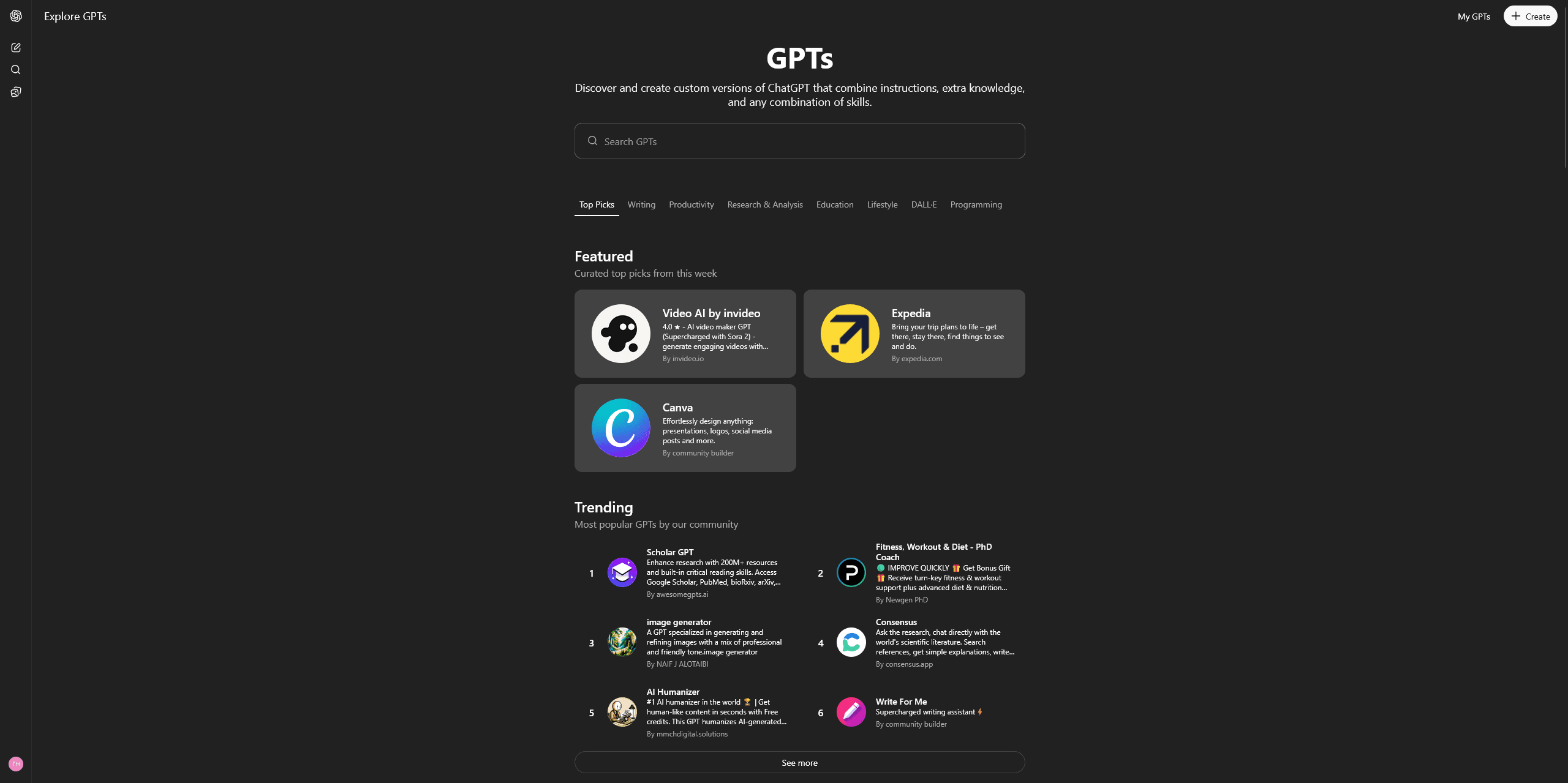
The GPT Store launched in January 2024, giving creators a place to publish and users a place to discover. Adoption was fast — over 3 million Custom GPTs were created in the first few months, though only about 159,000 were made public.
What they fixed
Better discoverability. The GPT Store is integrated into ChatGPT's interface. Users can search and browse GPTs by category. Featured GPTs get prominent placement.
Lower creation barrier. You can create a Custom GPT without writing any code. Upload documents, write instructions, and you have a working GPT. Actions require an OpenAPI spec, but the GPT itself is no-code.
Bundled experience. Instructions, knowledge, and tools are packaged together. The user gets a complete experience, not a raw tool.
What still was not great
Still proprietary. Custom GPTs only work on ChatGPT. The work you put into building one does not transfer to Claude, Cursor, or any other platform.
Text-only UI. Like the plugin beta, Custom GPTs can only render text responses. No structured widgets, no interactive elements, no rich data visualization.
Limited API integration depth. Actions work well for simple REST API calls but struggle with complex workflows, multi-step operations, and stateful interactions.
Distribution ceiling. Despite 3 million GPTs created, the GPT Store has not become the discovery engine OpenAI hoped for. Most GPTs get minimal traffic. The economics are unclear — OpenAI mentioned a revenue sharing program but it has not become a significant income source for most creators.
Fragmented naming. "GPTs," "Custom GPTs," "GPT Actions," "GPT Builder" — the terminology confused users and developers alike. Search "ChatGPT plugins" and you still get results mixing three different systems.
Custom GPTs are still active and useful for specific cases. But they are not where OpenAI is putting its strategic investment anymore.
MCP Apps (October 2025 - present)
How they work
At DevDay in October 2025, OpenAI announced native support for the Model Context Protocol — the open standard Anthropic released in November 2024. This was a strategic shift. Instead of building another proprietary system, OpenAI adopted the same protocol that Claude, Cursor, VS Code Copilot, and dozens of other AI clients already supported.
The app submission process opened in December 2025. The directory is at chatgpt.com/apps. OpenAI initially called these "connectors" but renamed them to "apps" in the December announcement. Pilot partners include Booking.com, Canva, Coursera, Expedia, Figma, Spotify, and Zillow.
For a deep dive on how apps work, see What Are ChatGPT Apps?.
What they fix
Open standard. MCP is not an OpenAI thing. Anthropic created it, and it is maintained as an open specification. Build one MCP server and it works across every MCP-compatible AI client. That is a radical change from the proprietary plugin beta and GPT systems. For the full protocol explanation, see What Is MCP?.
Rich UI. MCP apps can return structured content that ChatGPT renders as interactive widgets — cards, tables, carousels, charts, forms. Three display modes (inline, panel, full-screen) give developers real control over the experience. This is a massive upgrade from text-only responses.
Better architecture. MCP uses stateful sessions with initialization, capability negotiation, and structured tool invocation over JSON-RPC 2.0. This is more robust than the stateless REST calls of the plugin beta and actions.
Ecosystem momentum. With 70+ AI clients supporting MCP, developers are building tools that work everywhere. The protocol has over 80,000 GitHub stars and SDKs in TypeScript, Python, Java, Kotlin, C#, Go, Ruby, Rust, Swift, and Elixir.
Distribution scale. ChatGPT has 900 million weekly active users. The app directory puts your tool in front of that audience.
Side-by-side comparison
Here is the full breakdown across all three systems:
| Feature | Plugin Beta (shut down) | Custom GPTs + Actions | MCP Apps |
|---|---|---|---|
| Announced | March 2023 | November 2023 | October 2025 |
| Status | Shut down (April 2024) | Active | Active (primary) |
| Protocol | Proprietary (OpenAPI manifest) | Proprietary (OpenAPI schema) | Open standard (MCP) |
| Cross-platform | No | No | Yes (70+ clients) |
| Rich UI | No (text only) | No (text only) | Yes (widgets, 3 display modes) |
| No-code creation | No | Partial (GPT is no-code, Actions need OpenAPI) | Visual builders available |
| Discoverability | Manual browse/install | GPT Store | App directory |
| Auth support | OAuth, API key | OAuth, API key | OAuth, API key (standardized) |
| Session state | Stateless | Stateless | Stateful |
| Transport | REST/HTTP | REST/HTTP | Streamable HTTP, JSON-RPC 2.0 |
| Users reached | Limited (ChatGPT only) | ChatGPT only | 900M+ (ChatGPT) + other clients |
The pattern: proprietary to open
Looking at the three generations, there is a clear arc. The plugin beta was fully proprietary — OpenAI's format, OpenAI's directory, OpenAI's review process. Custom GPTs were still proprietary but lowered the creation barrier. MCP Apps adopt an open standard that works everywhere.
This pattern is not unique to OpenAI. It mirrors what happened with mobile messaging (proprietary protocols to XMPP/Matrix), with web APIs (SOAP to REST), and with identity (proprietary login systems to OAuth/OIDC). Ecosystems start proprietary, then consolidate around open standards as the market matures.
The difference this time is speed. It took mobile messaging a decade to consolidate. ChatGPT's tool ecosystem went from proprietary to open-standard in about two years. That is partly because Anthropic forced the issue by releasing MCP as an open specification and getting wide adoption before OpenAI could entrench a proprietary alternative.
Apps and Actions are mutually exclusive
One important detail that is easy to miss: a single Custom GPT cannot use both Actions and Apps simultaneously. If you want to add MCP app functionality to a GPT, you cannot also have API Actions on the same GPT. You have to choose.
This is a deliberate design choice. MCP and OpenAPI Actions are different protocols with different capability models. Mixing them would create ambiguity about which system handles a given request. In practice, this means existing GPTs with Actions need to be migrated to MCP if they want app capabilities.
For most new projects, the choice is straightforward — build an MCP app.
What should you build today?
The decision depends on your use case, timeline, and technical resources.
Build a Custom GPT if...
- Your tool is text-only and does not need rich UI. A writing assistant with custom instructions. A research helper with uploaded knowledge files.
- Your tool is ChatGPT-specific and does not need to work on other platforms.
- You want no-code simplicity and do not need API connections. Just instructions and knowledge files.
- You are prototyping quickly and want something live in minutes, not hours.
Custom GPTs are good for configured chat experiences. They are limited but fast to create.
Build an MCP app if...
- Your tool needs rich interactive UI — product cards, data tables, charts, forms.
- You want cross-platform compatibility — one build that works on ChatGPT, Claude, Cursor, and more.
- You are connecting to external APIs for real-time data.
- You want access to the app directory and ChatGPT's 900M+ users.
- You are building something you expect to maintain and grow over time.
MCP apps are the strategic investment. They are more capable, more portable, and aligned with where the industry is heading.
How to build an MCP app
Two paths. You can build from scratch with the TypeScript SDK or Python SDK, which gives you full control but requires protocol expertise, server infrastructure, and weeks of development.
Or you can use a visual builder like drio to build the tool visually, connect APIs, design widget responses, and deploy to all MCP clients with one click. That path takes minutes. For a walkthrough, see How to Add MCP Tools to ChatGPT or Build AI Apps Without Code.
What happens to existing Custom GPTs
Custom GPTs are not going away immediately. OpenAI has not announced a deprecation timeline, and millions of GPTs are in active use. But the investment signals are clear — apps are getting the new features, the directory, the partner attention, and the platform support.
If you have a Custom GPT with Actions, the smart move is to plan a migration to MCP. The underlying API logic stays the same — you are wrapping the same endpoints in a different protocol. The benefit is portability and richer UI.
If you have a Custom GPT that is just instructions and knowledge files (no Actions), there is less urgency. Those GPTs do not have an MCP equivalent because they do not call external tools. They might eventually be subsumed into a broader "agent" framework, but for now they work fine as-is.
Takeaways
- Three generations: Plugin beta (proprietary, never fully launched) to Custom GPTs (proprietary, still active) to MCP Apps (open standard, primary path).
- MCP is the winner. OpenAI adopting an Anthropic-created open standard is the clearest signal that MCP is the long-term foundation.
- Apps and Actions are mutually exclusive — you cannot mix them in a single GPT.
- Custom GPTs still work for simple text-only, ChatGPT-specific experiences. MCP apps are better for everything else.
- Build for MCP. Whether you use the SDK or a visual builder, MCP apps give you rich UI, cross-platform reach, and future-proof architecture.
Every proprietary platform eventually adopts or gets replaced by an open standard. ChatGPT's tool ecosystem just completed that transition in record time.
Get the Builder Brief
Weekly tactical notes on shipping ChatGPT apps, MCP integrations, and product-led distribution.