
ChatGPT Apps for Operations Teams
A research-backed look at how operations teams are using ChatGPT apps for status briefings, data-backed reviews, request intake, and queue triage.
Operations teams are already using ChatGPT apps. But not as generic "ops copilots."
The strongest operations apps in ChatGPT do one of three things well: they reconstruct the current state from work systems, turn operational data into a decision-ready brief, or help an operator push the next step forward without opening three more tools. That is the pattern showing up in the current app catalog on this machine, and it matches OpenAI's own framing. On October 6, 2025, OpenAI said apps in ChatGPT fit naturally into conversation and can include interactive interfaces inside the chat itself (OpenAI). As of April 23, 2026, OpenAI's business apps overview says app integrations bring context from your tools into ChatGPT so teams can create, analyze, and take action in one place (OpenAI).
That is exactly why operations is a strong fit.
Ops work usually starts with a natural-language question:
- what is blocked right now
- what needs escalation today
- which requests are aging out
- what changed since standup
- who owns the next handoff
But the answer lives in project boards, comments, tables, queues, forms, and docs. Chat is useful when it can pull that state together and return something an operator can act on immediately.
So if you are trying to understand where ChatGPT apps actually fit in operations, the short answer is this: they work best when the user is asking an operational question in plain language and the answer depends on live system context. If you want the broader product framing first, read How ChatGPT Apps Fit Into Your Business, Should Your Business Build a ChatGPT App?, and Build Custom ChatGPT Tools with MCP.
Where operations teams are actually using ChatGPT apps right now
In the current catalog, most operations-shaped apps live under PRODUCTIVITY, not an explicit OPERATIONS vertical. But the use cases are still obvious.
| Pattern | Real examples | Why it fits chat | Where it usually breaks |
|---|---|---|---|
| Work status and blocker briefings | Asana, Monday.com, Linear MCP Server | Leaders ask operational questions in language, not in board-filter syntax | Teams still fall back to the native tool if the app only summarizes and never helps close the loop |
| Structured operational reporting | Airtable | Ops data often sits in tables and bases that need synthesis more than raw display | Trust falls off when summaries are not clearly grounded in the source records |
| Request intake and response filtering | Jotform | Intake workflows begin with a request, form, or exception, not a finished ticket | Basic generation is easy; routing, approvals, and analytics are harder |
| Queue triage and escalation review | Pylon | Operators need a concise queue review before they need a full console | If the app stops at summaries, agents still jump back into the system of record |
| SOPs and handoff guidance | Asana plus historical work context | Teams often need the next process step, owner, and dependencies, not just a raw task list | The output gets weak if the app cannot tie guidance back to real prior work |
The important thing is that these apps are not winning because chat is novel. They are winning when chat becomes the fastest path from an ops question to a useful operational next move.
Status reconstruction is the clearest operations use case
This is the lane where operations apps already feel real.
Asana's OpenAI app page says teams can work with tasks, subtasks, comments, due dates, and project details inside ChatGPT to create summaries, understand priorities, and prepare clear status updates (OpenAI). It also gives operations-shaped sample prompts:
- What should I work on today?
- Identify overdue tasks and blocked work across a project
- Turn meeting notes into tasks and subtasks with owners and due dates
That is not a vague AI assistant. That is a concrete operations workflow.
OpenAI's Asana sync documentation says the app securely accesses projects, tasks, comments, tags, custom fields, assignees, and due dates, and that the upgraded app now includes MCP write actions alongside sync behavior (OpenAI Help Center). In other words, the app can start as a status surface and become an action surface when the trust model is ready.
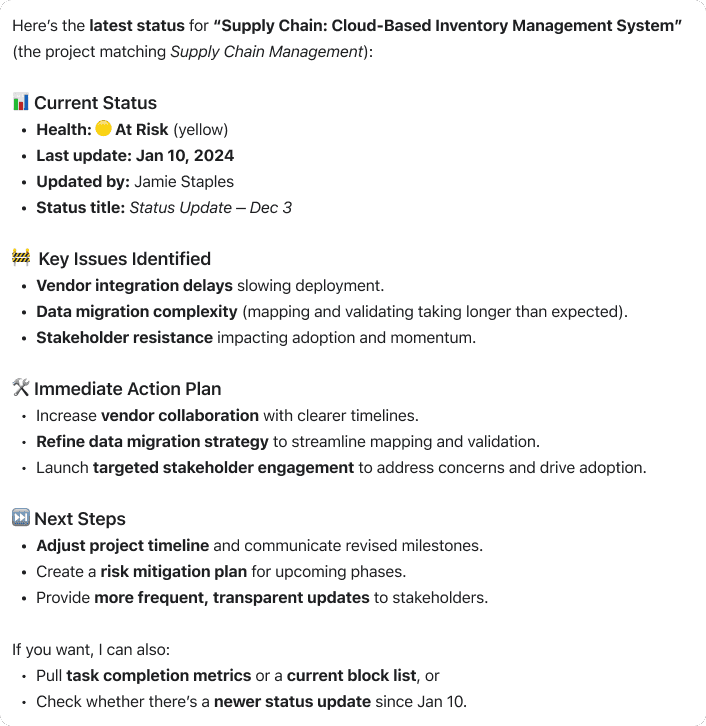
That is one of the most useful patterns in operations. The user is not asking for another dashboard. They are asking:
- what is slipping
- what is blocked
- what needs ownership
- what should happen next
The answer needs structure more than it needs a full UI clone.
Monday.com points in the same direction. Its ChatGPT integration guide says monday MCP lets teams manage tasks, query boards, and automate workflows through natural-language conversations (monday.com). Monday's MCP page goes further: AI tools can update data, create tasks, provide analysis, and only access what the connected user's monday.com permissions allow (monday.com).
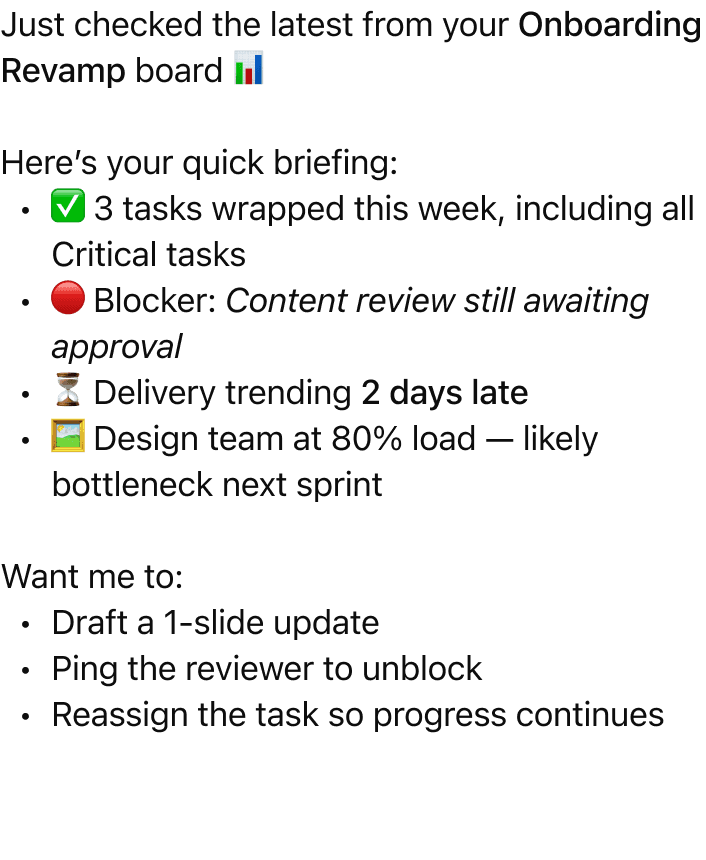
There is an important product lesson in Monday's own setup model too. The native ChatGPT integration is read-only first, while full integration unlocks broader functionality later (monday.com). For operations apps, that is not a weakness. It is often the right rollout sequence.
Structured operational data gets much more useful when chat turns it into a brief
The second strong operations lane is structured internal data.
Many ops teams do not live in a classic ticketing tool at all. They live in bases, tables, trackers, and lightweight operating systems built in tools like Airtable. The friction is not "we cannot find the table." The friction is turning live operational data into a usable briefing fast enough to act on it.
OpenAI's Airtable app page says teams can ask questions, explore roadmaps, and update records across Airtable bases in ChatGPT to make reporting, planning, and execution more efficient without switching tools (OpenAI). The same page is very explicit about the operations value:
- get faster answers from live operational data
- create or update tasks, statuses, and priorities directly from ChatGPT
- summarize initiatives into clear briefs for sales, executives, or partners
Airtable's own December 15, 2025 launch post says teams were constantly switching between ChatGPT and operational data in Airtable, and that the new app lets them reference, analyze, and update Airtable data without leaving ChatGPT (Airtable). One of its example prompts is pure operations: "Here are my notes from stand up. Update the status of all deliverables tracked in Airtable based on what we discussed."
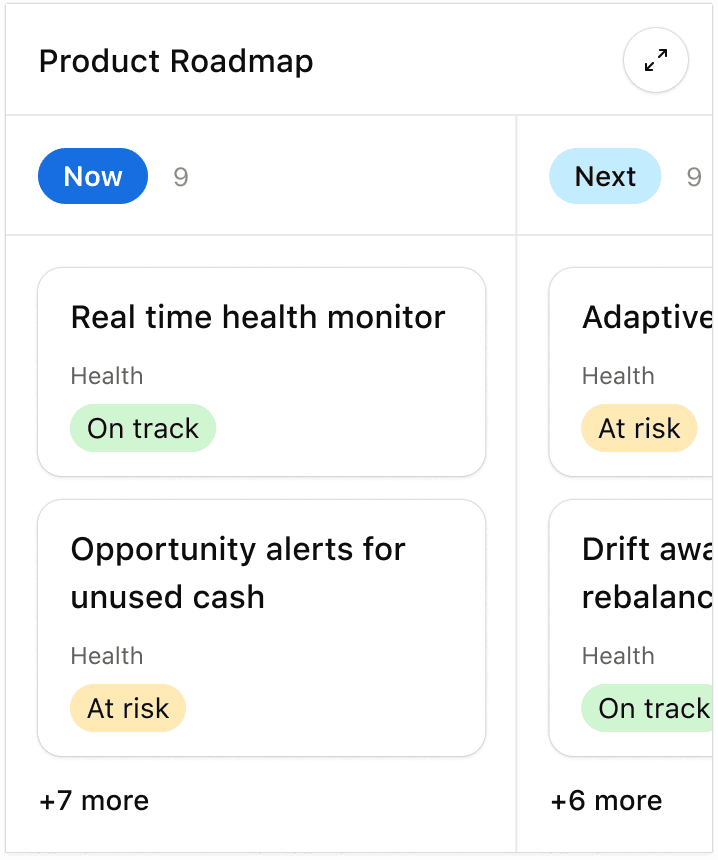
This is a huge clue for operations builders.
The best ops apps do not just search tables. They transform operational records into the exact artifact the user needs next:
- a standup brief
- a risk summary
- an executive pre-read
- a list of what is at risk this week
- a set of rows that need an update
That is much more valuable than another screen of raw records.
Intake and queue review are another real operations lane
Operations is not only about project status. It is also about requests coming in, getting triaged, and moving to the right owner.
That is why apps like Jotform and Pylon matter in the current catalog.
Jotform is interesting because it turns plain-language intent into an intake surface, then lets users retrieve and analyze submissions in chat. That makes it a good fit for:
- exception request forms
- onboarding intake
- internal service requests
- simple approval collection
Pylon is interesting for a different reason. It is closer to queue review and escalation handling. In the current catalog, its app is framed around checking assigned issues, summarizing recent issues from a customer, flagging escalations, and updating issues from chat. That is not just "support AI." It is an operations pattern: compress queue review into a clear next-action list.
This matters because a lot of operations work starts before there is even a structured project object. Sometimes the first step is simply:
- capture the request cleanly
- route it to the right owner
- summarize what needs attention
- preserve enough context for the handoff
That is a very ChatGPT-shaped job.
What operations teams should build first
If I were choosing a first ChatGPT app for an operations team today, I would start with one of these:
1. Daily status and blocker brief
Best for:
- project ops
- business operations
- program management
- cross-functional delivery teams
Why it works:
The question starts in natural language and the answer needs live work-state context, not another dashboard.
2. Cross-system handoff brief
Best for:
- teams that move work between intake, operations, and execution systems
- approval-heavy environments
- partner or customer onboarding workflows
Why it works:
The app can package current state, missing inputs, owner, risk, and next step into one clean output.
3. Intake triage workflow
Best for:
- people ops
- procurement ops
- internal tooling requests
- shared services teams
Why it works:
Ops teams often lose time translating messy requests into the right route and required fields.
4. Queue review and escalation summary
Best for:
- support ops
- service operations
- customer operations
- internal help desks
Why it works:
The operator wants a ranked answer to "what needs attention?" not a full queue console every time.
5. SOP and next-step guidance
Best for:
- teams with repeated operational rituals
- orgs with lots of process questions
- businesses where historical work is a useful guide for current execution
Why it works:
The app can turn prior work and live context into a clear recommendation instead of making people hunt through docs and old tasks.
What most operations teams get wrong
They build a generic ops assistant
That sounds ambitious and usually ships as something forgettable.
The better question is: what exact operational question should this app answer faster than the current workflow?
They stop at summaries
Status summaries are useful, but operations teams ultimately need a next move:
- who owns it
- what is blocked
- what should change
- what should be escalated
If the app never helps the user get to that next step, it becomes a nice-to-have read layer.
They make everything prose
Operations users often need structure more than elegance:
- grouped issues
- owner lists
- risk flags
- due dates
- recommended next actions
If every answer is a wall of text, trust drops fast.
They add writes too early
This is where the current app ecosystem is useful as a guide. Monday's ChatGPT setup explicitly separates a read-only native integration from a broader full integration (monday.com). OpenAI's synced-app help article also says apps with sync are initially designed to work best for Q&A and search, while upgrades can add new capabilities like write actions (OpenAI Help Center).
For operations, that is often the right sequence:
- get the state reconstruction right
- make the output reusable
- add safe, obvious next actions
- only then expand deeper mutation
They hide the source of truth
The app should reduce navigation cost, not create a shadow operating system nobody trusts. The strongest ops apps still make it obvious what system holds the live state.
If you have an operations company and want to build a ChatGPT app
Start with one repeated operations question, not with your whole operating model.
That question should have all four of these traits:
- users already ask it in natural language
- the answer depends on live work or process data
- the output should be structured and immediately reusable
- the next action can be made clear without too much risk
In practical terms, that usually means:
- Pick one workflow such as daily blocker review, request triage, handoff preparation, or queue escalation review.
- Connect only the systems needed for that workflow.
- Start read-first if the workflow is high consequence.
- Return ops-native outputs like blocker lists, owner tables, handoff briefs, or risk summaries instead of generic prose.
- Add safe follow-up actions only after users trust the retrieval and output quality.
- Pilot with one team, measure time saved and ambiguity reduced, then expand.
That last point matters. The best operations apps in the market today are not trying to replace Asana, Monday, Airtable, or a queueing system. They are trying to make those systems easier to operate through conversation.
If you want the implementation path next, the best follow-on reads are Build Custom ChatGPT Tools with MCP, Building MCP Tools with Rich UIs, and Should Your Business Build a ChatGPT App?.
Summary
Operations is one of the strongest categories for ChatGPT apps, but the winning patterns are more specific than "AI ops copilot."
Right now, the clearest examples are:
- status and blocker briefings from work tools
- operational data turned into decision-ready reports
- intake and triage workflows
- queue and escalation summaries
- SOP and next-step guidance from historical work
As of April 23, 2026, the lesson from the current catalog is straightforward: operations apps work best when they take messy live work context and turn it into a clear next move. That is where ChatGPT apps stop feeling like demos and start feeling like useful operating software.
FAQ
Are ChatGPT apps actually useful for operations teams?
Yes, when the workflow is narrow enough.
The strongest operations apps reduce time spent reconstructing status, routing requests, summarizing queues, and preparing handoffs. They are most useful when they return a clear operational next step instead of just a nicer chat interface.
What is the best first ChatGPT app for an operations company?
Usually a daily status brief, a blocker review, an intake triage flow, or a queue summary.
Those workflows are easy to scope, easy to evaluate, and much easier to trust than a broad assistant that tries to handle all of operations at once.
I have an operations company. How do I build a ChatGPT app?
Start with one recurring question your users already ask all the time, like "What is blocked right now?", "Which requests need escalation today?", or "Turn this standup into updated deliverables and owners."
Then connect only the systems needed for that question, make the first version read-first if necessary, return a structured output people can reuse immediately, and only add writes once the team trusts the retrieval and summary quality.
Should operations apps write into our systems on day one?
Usually not.
Read-heavy workflows often make the best first release because they are safer and easier to validate. Once users trust the status reconstruction and output format, then it makes sense to add controlled actions like creating a task, updating a status, or routing a request.
What data should an operations app connect to first?
Start with the one or two systems that actually answer the workflow question.
For example, a blocker brief may need only a project system and a notes source. A triage workflow may need just an intake form plus a task system. A good ops app gets narrower before it gets broader.
Get the Builder Brief
Weekly tactical notes on shipping ChatGPT apps, MCP integrations, and product-led distribution.