Build AI Apps Without Code
A practical guide to building AI apps without code: what counts as a real AI app, where visual builders help, and when you still need engineering.
Yes, you can build many AI apps without code now, but only if the app fits the right shape. If the job is to define tool inputs, connect APIs, map structured data to UI, and publish an endpoint that AI clients can use, a visual builder can handle real production work without handwritten server code. If you need unusual security rules, deep backend orchestration, or custom protocol behavior, you still want engineers involved.
The shift here is bigger than "chatbots got better." Anthropic introduced the Model Context Protocol on November 25, 2024 as an open standard for connecting AI systems to tools and data. OpenAI introduced apps in ChatGPT on October 6, 2025, and as of December 17, 2025 renamed connectors to apps. That combination is what makes serious no-code AI app building possible now.
What this guide is actually for
This post is an educational guide, not a vendor roundup.
If you are trying to understand whether "build AI apps without code" is a real category, what these apps look like, and where a visual builder helps, you are in the right place. If you are deep in pricing, feature matrices, or procurement, treat this page as the framing layer first, then move into product-specific evaluation.
That distinction matters because not every "AI builder" query means the same thing. Some people want a landing-page-style comparison. Others want to know whether they can launch a real ChatGPT app, Claude workflow, or Cursor tool without standing up an MCP server by hand.
If you landed here looking for a no-code AI app builder or a no-code ChatGPT app builder, that is the real question underneath the search. This post is for that second group.
What counts as an AI app now
The phrase "AI app" gets used too loosely. In practice, there are at least three different things people mean:
- A prompt wrapper that calls a model and returns text
- A connected tool that can access current data or take actions
- A chat-native app that can both work with external systems and present a clearer interface than plain text alone
The second and third categories are where this gets interesting.
OpenAI's guidance on what makes a great ChatGPT app is a useful filter: strong apps help users know something new, do something real, or see information in a clearer interface. That is a much better bar than "it has AI in it."
So when we talk about building AI apps without code, we are not talking about spinning up another toy chat widget. We are talking about tools that:
- read from real systems
- return structured results
- sometimes render interactive UI
- can be connected to AI clients through MCP-compatible flows
If you need the protocol background first, read What Is MCP?.
Why this category opened up
Three things changed.
The protocol layer became usable
MCP gives builders a shared way to expose tools and data to AI clients. Anthropic's launch post frames it as an open standard for secure, two-way connections between data sources and AI-powered tools, and the official MCP docs describe the server building blocks as tools, resources, and prompts.
That matters because teams no longer need a one-off integration for every host from scratch.
The distribution layer became real
OpenAI now treats apps in ChatGPT as connected experiences that can search, reference, take actions, and in some cases show interactive in-chat interfaces. Developers can test their own apps through developer mode and connect a public MCP endpoint in ChatGPT's settings flow.
In other words, there is now a credible path from "I built something useful" to "people can use it inside the AI product they already open every day."
The UI layer got better
Plain text is still useful, but it is not enough for every workflow. Some jobs need tables, charts, forms, product cards, maps, or other structured surfaces. OpenAI's MCP Apps compatibility docs now describe a portable embedded UI model for ChatGPT, which is a meaningful step up from "tool calls return text blobs."
That is the moment when visual builders start to matter. Once tools, UI, and distribution all exist, the bottleneck becomes developer effort.
Why building these apps is still hard without the right tooling
The presence of a standard does not remove implementation work.
Even a fairly simple AI app usually needs all of the following:
- a clean tool definition with schema-shaped inputs
- a reliable connection to an API, database, or internal system
- response mapping from raw data into a usable format
- testing in the target client
- a public endpoint if the host expects a remote MCP server
That last point is easy to miss. OpenAI's current Connect from ChatGPT flow expects a public /mcp endpoint when you create an app from your server. So even if your idea is simple, you still need a real runtime and a real deployment path.
This is exactly where no-code breaks down unless the builder is doing serious work under the hood. A UI that only chains prompts together is not enough. A useful builder needs to handle the app structure itself.
If you specifically want to build custom ChatGPT tools or build an MCP server without code, the test is simple: can the builder give you a real endpoint, real tool definitions, and a real testing loop? If not, it is still prototype territory.
If you are actually comparing build paths
There are three practical ways to build this category of product today:
| Path | Best when | Strengths | Tradeoffs |
|---|---|---|---|
| Visual builder | the workflow is API-driven, schema-friendly, and maps well to standard widgets | fastest route to a usable pilot, easier handoff across product and GTM teams | less flexibility for unusual auth, custom logic, or edge-case transports |
| Code-first MCP app | you need custom backend behavior, strict control, or non-standard integrations | full control over server logic, auth, and deployment | slower to build, higher maintenance burden |
| AI-generated code | you are exploring or prototyping quickly | fast experimentation and idea pressure-testing | you still own the code, and the result is only as good as your ability to review and maintain it |
The important distinction is that AI-generated code is not the same thing as no-code.
If an assistant writes a server for you, you still have a server to debug, secure, deploy, and maintain. That can be a great path for technical teams. It is just a different category from a visual builder where the configuration itself is the artifact your team edits and ships.
If your goal is the code-first path, Build Custom ChatGPT Tools with MCP is the better next read. If your question is more about the ChatGPT-facing runtime, OpenAI Apps SDK Guide explains where the Apps SDK sits on top of MCP.
What a no-code AI builder actually needs to handle
If you are evaluating this category seriously, look for five capabilities.
Tool definitions
The builder should help you define a clear tool surface with input fields the model can reason about, not just free-form prompt boxes.
Real data connections
It should connect to actual APIs and data sources, not just canned demos. If the app cannot work with live systems, it is not solving the hard part.
UI mapping
Useful AI apps need more than markdown. The builder should let you map response fields into the right output pattern, whether that is a table, chart, form, card, or summary view.
Preview and testing
You should be able to inspect what the user will see before rollout. That includes sample prompts, empty states, and common edge cases.
Deployment to a real endpoint
You should end up with an actual MCP endpoint or equivalent runtime surface that can be connected to supported clients. Otherwise you are building a demo, not an app.
Not every visual builder is solving the same job
The broader market proves the category is real, but it also shows how different the jobs are. Adalo frames AI app building around generating multi-screen apps you can publish to web and native stores. Figma Make frames it around prompting, iterating, and testing app flows inside the design workflow.
Both are legitimate visual-builder examples. They just answer a different question than "how do I build ChatGPT tools without coding?" For that narrower use case, the bar is higher: the builder has to produce a usable MCP surface, not just a prototype.
Want the MCP side first?
If the "tool definition" and "endpoint" language feels new, start with What Is MCP?. If you already have a tool and want to connect it to ChatGPT, go straight to How to Add MCP Tools to ChatGPT.
What you can build first
The best first AI apps are narrow, current, and obviously useful.
Product search and recommendation
Instead of a long paragraph of search results, the assistant can return product cards or a carousel with images, prices, and follow-up actions. This is one of the clearest examples of where conversation plus structured UI beats a normal search box.
Internal reporting
You can connect analytics, CRM, or operations data and return tables, charts, or stat cards inside the conversation. This is a strong fit when the user wants a quick answer and a quick scan, not a full BI workflow.
Support and intake flows
Forms and structured follow-up actions are useful for collecting order IDs, issue details, booking preferences, or qualification data without forcing the user into a separate workflow immediately.
Research and handoff tools
A good AI app can gather data, summarize it, and then hand the user into a structured next step. That might be a shortlist, an approval flow, or a follow-up tool call.
If you want to see the UI side of that in more detail, read Building MCP Tools with Rich UIs.
Where drio fits
drio is built for teams that want the builder route without treating the app as a fake prototype.
The rough analogy is Shopify: not because the products are identical, but because the category shift is similar. Shopify made online commerce accessible without forcing every merchant to assemble the stack from scratch. A no-code AI app builder should do the same for MCP-backed apps.
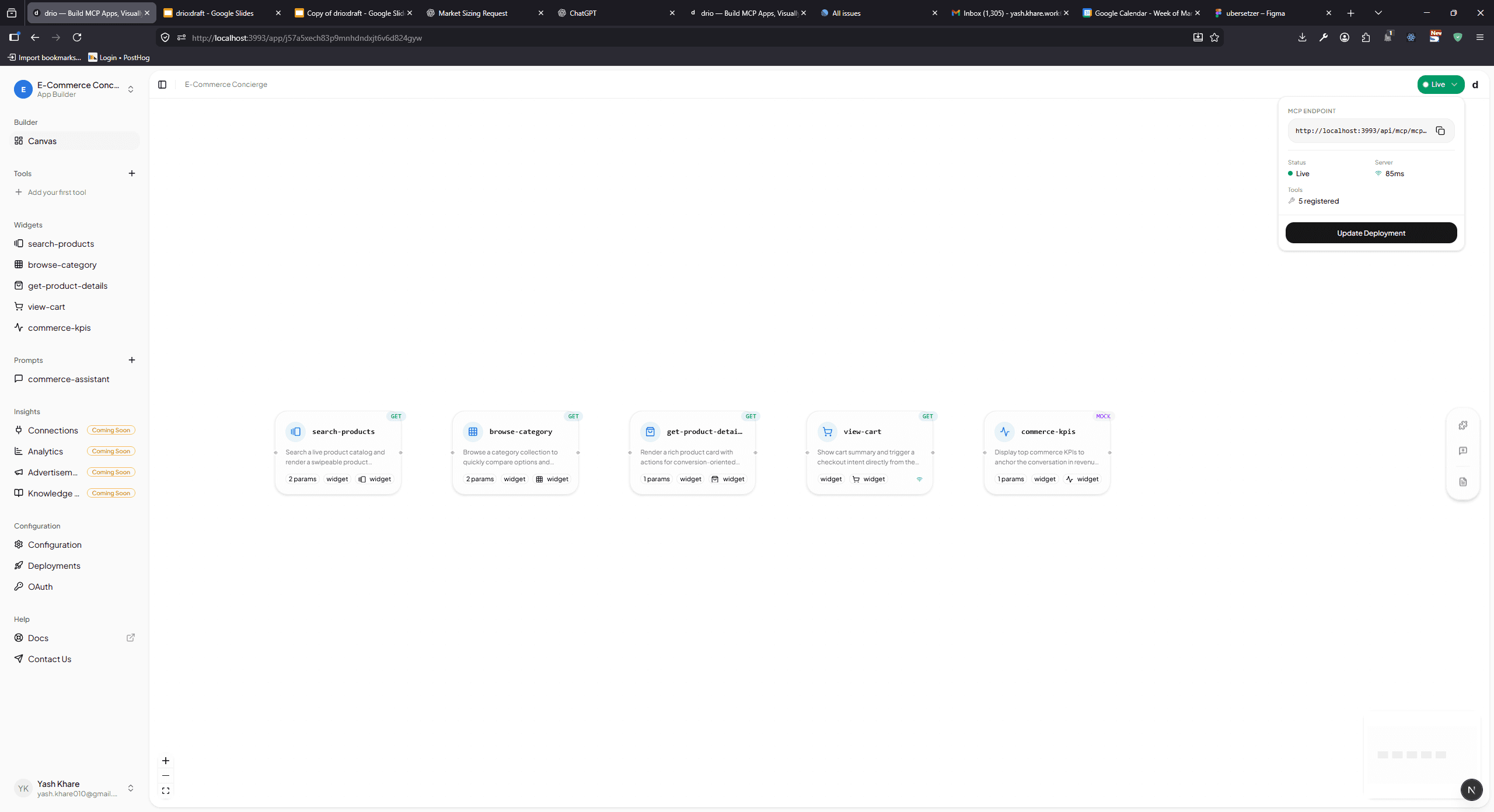
The workflow in drio is straightforward:
- define the tool and its inputs in the builder
- connect an API or data source
- map the response into the right widget
- preview, brand, and publish the app
From there, the app gets a live MCP endpoint you can use with supported AI clients. The docs break that flow down in Quickstart, How drio Works, and MCP endpoint configuration.
The key point is that the visual configuration is the source of truth. Your team is not re-prompting an AI to regenerate the app every time you make a change. You are editing a real app definition and using that to produce a usable runtime.
If you want the product introduction version of that story, read Welcome to drio. If you want the founder-side reason this category matters to us, read Why We Built drio.
What no-code does not remove
No-code changes who can build the first version. It does not remove judgment.
You still need to decide:
- which systems the app is allowed to touch
- whether the data is public, shared, or user-specific
- how much risk is acceptable for write actions
- which client you actually need to support first
And there are still cases where code-first is the better path:
- complex server-side orchestration
- highly custom auth or security requirements
- transport or protocol behavior outside the normal path
- teams that want full control over every runtime detail
That is not a failure of no-code. It is just scope discipline.
When this guide should hand off to a builder comparison page
This page should help you understand the category and the build shape. It should not try to be the final buyer's guide.
If you are already comparing pricing, auth models, governance, templates, and deployment ownership, that is where a dedicated builder comparison page should take over. This guide stays informational on purpose so it does not compete with that future page before it exists.
Ready to launch a first app?
If you want the fastest path from idea to something testable, start with Quickstart, then use MCP endpoint configuration and How to Add MCP Tools to ChatGPT once your endpoint is live.
If you want a tighter walkthrough before that, From Idea to AI App in 10 Minutes is the shorter bridge. If you want the broader product picture first, join drio at getdrio.com.
Summary
You can build many AI apps without code now, but the meaningful category is narrower than the hype suggests. The strongest no-code workflows are the ones where a team needs to define tools, connect live systems, map structured output to UI, and publish a usable endpoint without standing up the whole stack manually.
That is why MCP matters, why apps in ChatGPT matter, and why visual builders matter. The protocol made connected AI apps more portable. Distribution made them worth shipping. Builders make the workflow accessible to more than just backend engineers.
FAQ
Can you really build AI apps without code?
Yes, for many API-driven workflows you can. If the app mostly needs tool inputs, live data connections, structured output, and a standard deployment path, a visual builder is enough. If the app needs unusual backend logic or deep security customization, bring engineering in earlier.
What is the difference between a no-code AI app and a chatbot?
A chatbot usually just generates text. A no-code AI app connects the model to real tools or data, often returns structured output, and may let the user take a next step from inside the conversation.
When should I choose code-first instead of a visual builder?
Choose code-first when the hard part of the app is custom server behavior, not UI and mapping. That includes non-standard auth, complex orchestration, deep compliance requirements, or cases where your team needs total control over the runtime.
Can a no-code AI app still work in ChatGPT?
Yes, if it produces the kind of endpoint and app behavior ChatGPT expects. OpenAI's current workflow supports custom apps built with MCP, and the setup path revolves around connecting a public MCP server or compatible app surface.
Does MCP still matter if I use a visual builder?
Yes. Even if you never hand-write the server, MCP is still the protocol layer that explains how AI clients discover tools and connect to the app. The builder makes MCP easier to use; it does not make the protocol irrelevant.
Get the Builder Brief
Weekly tactical notes on shipping ChatGPT apps, MCP integrations, and product-led distribution.