
AI Tools for E-Commerce: Build Shopping Assistants with MCP
How to build AI shopping tools for e-commerce with MCP — product search, card carousels, cart management, and order tracking, all inside ChatGPT and Claude.
AI assistants are becoming shopping channels. Consumers are asking ChatGPT for product recommendations, comparing options in conversation, and making purchase decisions without ever visiting a website. E-commerce businesses that show up in these conversations — with interactive product cards, real-time inventory, and in-chat purchasing — will capture a growing share of revenue.
This guide covers how to build AI shopping tools for e-commerce using MCP (Model Context Protocol) and drio. If you need the MCP fundamentals, start with What Is MCP?.
The shift to conversational commerce
Something is changing in how people shop online. Instead of browsing websites, a growing number of consumers start with an AI assistant:
"Find me running shoes under $150 with good arch support"
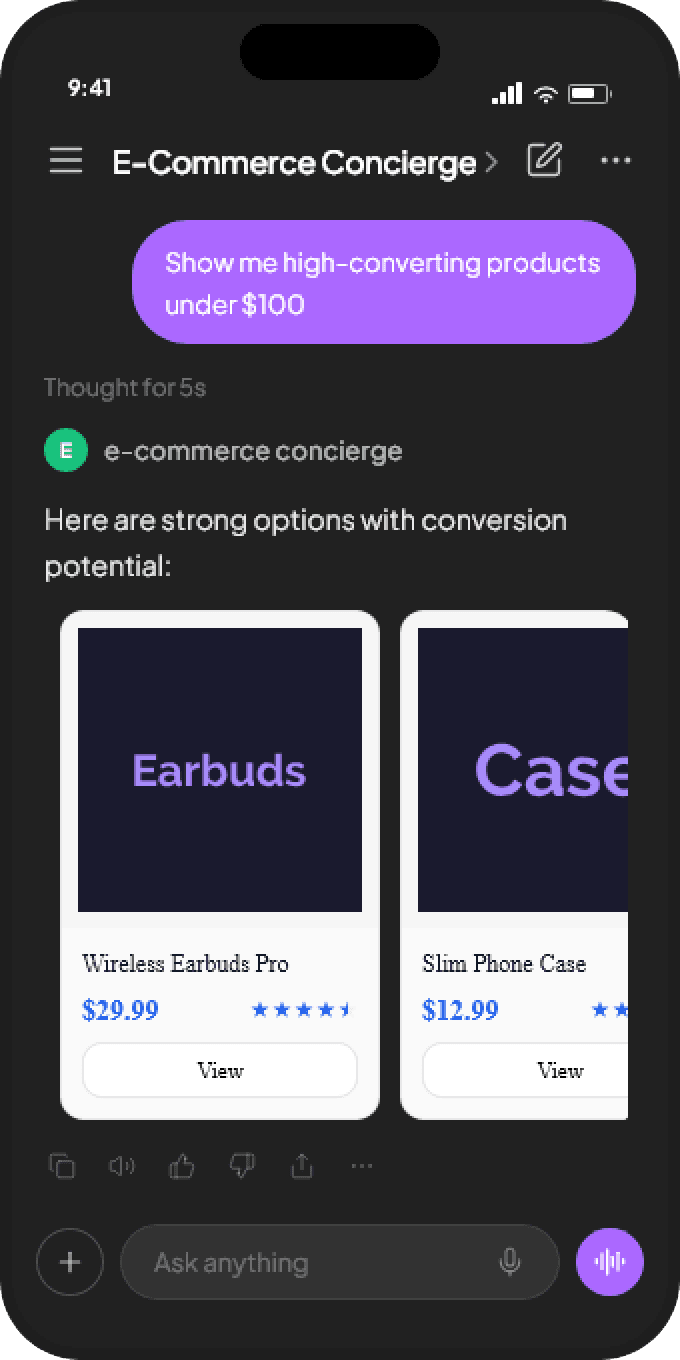
If your products are available as an MCP tool, the AI can invoke your product search, return interactive product cards with images and prices, and let the customer add items to a cart — all inside the chat. No website to navigate. No search filters to figure out. Just a conversation.
The numbers are early but directional: AI-referred traffic converts at roughly 2X the rate of traditional web traffic. McKinsey's research on personalization shows that personalized experiences drive significantly higher conversion and customer satisfaction — and conversational commerce is personalization by default.
What MCP looks like in e-commerce
If you phrase it the way a store operator would, "MCP for ecommerce" just means turning your catalog, cart, and order systems into tools an AI assistant can use.
That usually shows up as:
- product search inside ChatGPT or Claude
- interactive product cards with real prices and inventory
- cart and checkout handoff flows
- order tracking and post-purchase support
Same store. Same backend. New interface layer.
What an e-commerce MCP app looks like
A complete e-commerce MCP app typically includes 3-5 tools that work together:
Product search
The core tool. Accepts search queries, filters (category, price range, size, color), and returns matching products as a carousel of product cards.
Each card shows:
- Product image
- Name and brand
- Price (with sale price if applicable)
- Rating and review count
- "View Details" and "Add to Cart" action buttons
Product details
When the customer clicks "View Details" on a card, this tool returns a detailed view with full description, size guide, shipping info, and customer reviews.
Cart management
Handles add-to-cart, view cart, update quantity, and remove items. The cart renders as a data table with product thumbnails, quantities, and a total. Action buttons for "Update" and "Remove" on each row.
Order tracking
For existing customers, a tool that accepts an order number or email and returns order status, shipping tracking, and estimated delivery. Renders as a stat card with timeline.
Recommendation engine
Optional but powerful. Returns personalized suggestions based on what the customer is browsing. "Customers who bought this also bought..." rendered as a product carousel.
Building it with drio
Here is how to build a basic product search tool with drio, using the Shopify Storefront API as an example:
Step 1: Create the search tool
- Name:
search_products - Description: "Search for products by keyword, category, and price range"
- Parameters:
query— Text, required. "Search term (e.g., running shoes, winter jacket)"category— Dropdown, optional. Your product categories.max_price— Number, optional. "Maximum price in dollars"
Step 2: Connect the Shopify API
Add an API Request node:
- Method: POST (Shopify Storefront API uses GraphQL)
- URL:
https://your-store.myshopify.com/api/2024-01/graphql.json - Headers:
X-Shopify-Storefront-Access-Token: {{your_token}} - Body: A GraphQL query that searches products by the user's parameters
Configure the Storefront Access Token in drio's Auth tab. This token has read-only access to your public product data — it is safe to use in a customer-facing tool.
Step 3: Map to product cards
Drag a Carousel widget with Product Card children onto the canvas. Map:
- Image: Product featured image URL
- Title: Product title
- Price: First variant price
- Subtitle: Product type or brand
- Actions: "View Details" (sends product ID back to AI), "Add to Cart" (triggers cart tool)
Step 4: Deploy
Click Deploy. Add the MCP endpoint to ChatGPT. Your products are now discoverable inside AI conversations.
Widget patterns for e-commerce
Product carousel with actions
The most important pattern. A carousel of product cards with click actions that trigger other tools. This creates a browse-and-drill-down experience that feels natural in conversation.
The action flow:
- User searches → Carousel of product cards
- User clicks "View Details" → Detail card with full info
- User clicks "Add to Cart" → Cart confirmation + "View Cart" option
- User asks to check out → Cart summary with checkout link
Price comparison table
For tools that compare options (different sizes, different sellers, different configurations), a data table with sortable columns works well. Include an "Add to Cart" action on each row.
Stat dashboard for order tracking
Order status works well as a stat dashboard: order number, status badge, estimated delivery date, and tracking link. Below the stats, a timeline of shipping events.
Forms for customization
If your products have customization options (engraving text, custom sizing, gift wrapping), a form widget collects the input and passes it to the cart tool.
Real-world considerations
Inventory accuracy
Your MCP tool calls your API in real-time. If a product is out of stock, the tool should not show it (or should show it as "Out of Stock" with a notify-me option). Stale data in a conversational interface is worse than on a website — the user trusted the AI's recommendation.
Pricing consistency
Make sure the prices in your MCP tool match your website. If you run sales or dynamic pricing, the API response should reflect the current price. Discrepancies erode trust.
Authentication for personalized experiences
Anonymous product search works without authentication. But personalized recommendations, cart persistence, and order tracking need user identity. drio supports OAuth 2.0 — the customer authorizes your tool once, and subsequent requests are authenticated.
Rate limiting
If your Shopify API has rate limits, implement caching in your tool. Popular products and category listings change infrequently — a 5-minute cache significantly reduces API calls without affecting user experience.
Beyond Shopify
This guide used Shopify as an example, but the pattern works with any e-commerce platform:
- WooCommerce — REST API with similar product/cart/order endpoints
- BigCommerce — GraphQL and REST APIs
- Custom catalog — Any REST API that returns product data
- Headless commerce — If you already have a headless commerce API, it is already MCP-ready — just add the drio wrapper
The protocol and widget patterns are the same regardless of the backend.
The opportunity
E-commerce businesses that build MCP tools now are building for a distribution channel that is growing rapidly. When someone asks ChatGPT "recommend a good winter jacket under $200" and your products show up as interactive cards with "Add to Cart" buttons — that is a sale that did not come from Google, did not come from paid ads, and did not require the customer to visit your website.
The businesses that show up in AI conversations first will have a structural advantage as this channel matures.
For more on building tools for AI assistants, see Build AI Apps Without Code. For examples of what the community is building, see Community Spotlight.
The next generation of e-commerce will not be websites people browse — it will be tools that AI assistants invoke. Make sure your products are in the conversation.
Get the Builder Brief
Weekly tactical notes on shipping ChatGPT apps, MCP integrations, and product-led distribution.