
Welcome to drio
Meet drio, the visual MCP app builder for teams that want to connect APIs, design chat-native UIs, and publish a real MCP endpoint without starting from scratch.
drio is a visual MCP app builder for teams that want to ship a real AI-facing app without starting from a blank server. You define the tool, connect the data source, choose the response format, preview the experience, and publish an MCP endpoint that AI clients can use. That is the short version.
Why this matters now is pretty simple. The official Model Context Protocol site describes MCP as an open standard for connecting AI applications to external systems, and Anthropic introduced it on November 25, 2024 as a way to replace fragmented one-off integrations with a shared protocol layer. Then OpenAI said on October 6, 2025 that the new Apps SDK for ChatGPT builds on MCP, and its current Help Center now treats connected experiences under the broader label of apps in ChatGPT. So yeah, the protocol is real now. The harder part is still the workflow.
If you want the protocol explainer first, start with What Is MCP?. If you already want the product architecture, How drio Works is the faster read.
If you are trying to decide whether drio is relevant
The easiest way to frame it is this:
| If you need to... | drio is usually a good fit when... | Better to stay code-first when... |
|---|---|---|
| launch a first AI app quickly | the workflow is clear and the main work is tool design, API connection, and UI mapping | the hard part is custom runtime logic or unusual infrastructure |
| let product, GTM, or ops shape the experience | the app needs shared review and visible configuration | the app only makes sense as an engineering-owned codebase |
| return richer in-chat UI | the answer should be a table, card, form, chart, or another structured widget | plain text alone is enough and the UI layer adds no value |
| publish an MCP endpoint | you want a real endpoint without rebuilding the whole stack manually | you need a bespoke server architecture from day one |
That is really the product boundary. drio is not trying to erase engineering. It is trying to make the first useful build loop much clearer.
What drio actually does
At a high level, drio turns a visual app definition into an MCP-compatible runtime.
In practice, that usually means your team can:
- define a focused tool and the inputs it should accept
- connect the tool to an API or other source of truth
- map the result into the widget that best fits the answer
- preview the empty, success, and error states
- publish a live endpoint and test it in the client you care about
That part matters. drio is not a prompt wrapper and it is not a static mockup tool. The point is to go from "we know what this app should do" to "we have a working endpoint and a usable interface" without turning the first version into its own infrastructure project.
Why this workflow exists now
Before MCP, there was no obvious shared protocol to build around. Every host had its own shape, every integration had its own glue, and every team had to decide how much custom plumbing it wanted to own.
That changed.
The official MCP site frames the protocol with the "USB-C port for AI applications" analogy. The underlying idea is solid: one shared way for AI apps to connect to tools, resources, prompts, and external systems. The official clients page also shows another important detail that a lot of summaries skip: support is real, but it is not identical everywhere. Different hosts support different subsets of MCP features.
OpenAI's MCP Apps compatibility guide pushes the same practical lesson from the UI side. Build against the shared MCP Apps standard first, then add ChatGPT-specific behavior only when you actually need it.
That combination is basically the reason drio exists:
- the protocol is standardized enough to build on
- host distribution is real enough to care about
- the UI layer matters enough that plain text is often not the right answer
What a good first drio app looks like
The best first app is not the most ambitious one. It is the one with a clear job.
Usually that means:
- one audience
- one source of truth
- two to five focused tools
- one output pattern the user can understand quickly
Good first examples look more like this:
- a product finder that turns API results into cards instead of paragraphs
- a support assistant that checks order status, shows account context, and collects structured details before a handoff
- an internal reporting tool that turns raw metrics into a table or chart
If you want concrete category examples, these posts map well:
The mistake teams make here is starting with "build an app that can do everything." That usually turns into fuzzy tool descriptions, weak data contracts, and a UI that feels busy instead of useful.
The build loop is meant to stay visible
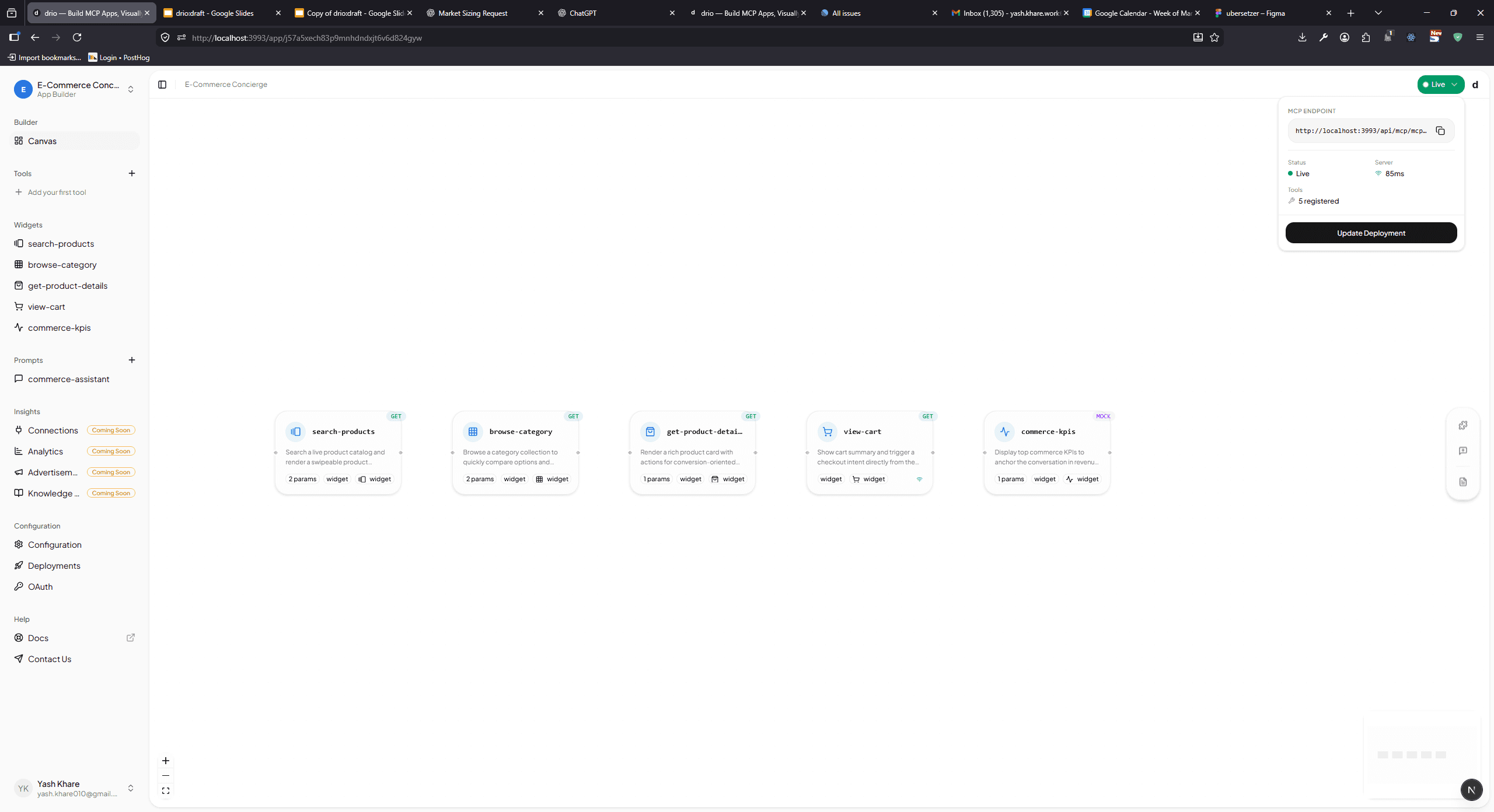
The product docs already show the cleanest version of the workflow, and that is still the right way to think about it:
- pick one use case with real user questions
- add a small set of focused tools
- connect a reliable API or data source
- choose the widget that matches the user's next decision
- preview, publish, and test the live endpoint in the target client
That might sound obvious, but it is the part a lot of code-first flows blur together. When the tool, the data mapping, and the UI contract are all visible, review gets easier too. Product can check the experience. GTM can check the language and use case. Engineering can check auth, system boundaries, and rollout risk.
If you want the hands-on version of that build path, read Connecting Your First API. If the main question is response design, Building MCP Tools with Rich UIs and Choose The Right Response Format are the better next stops.
What stays in your team's control
This part is important because a builder should not hide the decisions that actually matter.
Your team still decides:
- which systems the app is allowed to call
- whether access should be public, shared, or user-specific
- how auth should work for protected systems
- how much review is required before rollout
- whether engineering should automate against the management API directly
That split is already reflected in the docs. The builder owns the repetitive runtime work. Your team still owns the system boundaries.
If you are dealing with protected systems, the right follow-up pages are Add sign-in for protected systems, Delegated OAuth configuration, and Connect to AI clients.
drio versus AI-generated code versus a custom build
This is usually the real evaluation, even when nobody says it that directly.
| Approach | Strongest when... | Main tradeoff |
|---|---|---|
| custom code-first MCP build | the app needs unusual server logic, strict infra control, or deep custom behavior | slower first launch and a larger maintenance surface |
| AI-generated code | the team wants a fast prototype and can own the generated code afterward | review, cleanup, and long-term maintainability still fall on the team |
| drio | the value is in tool design, data connection, widget choice, and getting a real app live faster | highly custom runtime behavior may still need engineering outside the builder |
The honest version is that these are not enemies. Plenty of teams will use more than one path.
Sometimes drio is the fastest way to prove the workflow. Later, engineering can go deeper where it actually matters. Sometimes the opposite is true and the app really should start code-first. The useful question is not "which approach wins forever?" It is "where is the real complexity in this app?"
When drio is not the right fit
drio is a worse fit when:
- the hard part is custom server logic, not the app workflow
- the auth model is unusual enough that you need a bespoke architecture first
- the team is still unclear on the job the app should do
- the app is basically an experimental agent runtime, not a defined product experience
That last one matters more than people expect. A builder works best when the workflow is known enough to model. If the whole point is open-ended research on novel agent behavior, the right first step might not be a builder at all.
What teams usually get wrong
They start too broad
"One app for everything" sounds efficient. It usually makes tool selection and response design worse.
They optimize prompts before they trust the data path
If the API response is inconsistent or the tool boundary is vague, prompt work will not save the product.
They pick the widget too early
The best widget usually falls out of the data shape and the user's next decision. It should not be chosen like a cosmetic theme.
They do not test the real client
The official MCP clients list is a good reminder here: support varies. The right endpoint is only half the job. The target host experience still has to be tested.
Start with the docs that match your job
If you are evaluating drio, do not start from a blank canvas. Start from the page that matches what you are trying to answer:
- How drio Works for the architecture summary
- Launch Your First App for the fastest practical path
- Choose The Right Response Format for widget decisions
- Connect to AI clients for the live endpoint flow
If you want the bigger market/category framing first, go to Build AI Apps Without Code.
Summary
drio is a visual MCP app builder for teams that want to define tools, connect real systems, choose the right chat-native UI, and publish a live endpoint without starting from a blank runtime. The reason it exists now is not hype. It is that MCP has become a real protocol layer, host support is real enough to build for, and richer in-chat interfaces are often more useful than plain text alone.
The value is not that drio makes judgment disappear. It is that the core build loop stays visible and easier to review. That makes it easier for mixed teams to ship the first useful version without turning every app into a full custom engineering project.
FAQ
What is drio?
drio is a visual builder for MCP apps. It helps teams define tools, connect APIs, map results to widgets, and publish a live MCP endpoint that AI clients can use.
Do I need to understand MCP before using drio?
Not deeply. It helps to know the basics, but the workflow is designed around tools, data sources, widgets, and endpoint testing rather than protocol theory. If you want the background first, read What Is MCP?.
Does drio replace custom MCP development?
No. Some apps still need code-first development, especially when the hard part is custom runtime behavior, unusual auth, or infrastructure control. drio is strongest when the workflow itself is clear and the friction is in getting the app assembled and reviewed.
Which clients can connect to a drio app?
The docs position drio for MCP-compatible AI clients such as ChatGPT, Claude, and Cursor. The broader MCP ecosystem supports many more hosts, but support varies by feature, so test the client you actually plan to launch first.
What is the best next step after reading this?
If you want the product architecture, go to How drio Works. If you want the quickest hands-on path, start with Launch Your First App. If you want to try the product, head to getdrio.com.
Get the Builder Brief
Weekly tactical notes on shipping ChatGPT apps, MCP integrations, and product-led distribution.