What Are Claude Plugins? The Current Answer in 2026
Claude plugins are now a real thing in Claude Cowork, but most Claude tool access still happens through connectors, desktop extensions, and MCP servers. Here is the clean breakdown.
If you search for "Claude plugins" in 2026, the right answer is: yes, but only on some Claude surfaces. Anthropic now has real plugins in Claude Cowork, where a plugin bundles skills, connectors, and sub-agents into one package. But most Claude tool access still happens through connectors, desktop extensions, and MCP servers, not through a single universal plugin system.
That is why older posts on this topic are now misleading. The old "Claude has no plugins" answer is no longer fully true. Anthropic's current Cowork plugin help article says plugins are available to Claude Cowork users on paid plans and that each plugin bundles together skills, connectors, and sub-agents. At the same time, Anthropic's broader connectors guide still describes connectors as the main way Claude accesses external tools and services across Claude, Claude Desktop, Claude Code, and the API. That naming shift matters too: Anthropic's ecosystem language has moved toward connectors as the broader cross-surface term, with plugins now being a more specific Cowork concept.
So the real question is not "does Claude have plugins?" It is which Claude product are you talking about?
The cleanest answer
| If you mean... | The current concept is... |
|---|---|
| Claude chat and Claude Desktop connecting to external services | Connectors |
| Claude Desktop connecting to local machine tools | Desktop extensions or local MCP |
| Claude Code connecting to tools in developer workflows | MCP servers |
| Claude Cowork role-based bundles | Plugins |
That is the product split as of April 23, 2026.
The answer depends on the Claude surface
Anthropic now has multiple Claude surfaces, and they do not all use the same tool packaging model.
Claude and Claude Desktop: connectors
Anthropic's current connectors guide says connectors let Claude access apps and services, retrieve data, and take actions within connected services. It also says connectors work across:
- Claude
- Claude Desktop
- Claude Code
- the API via the MCP connector
This is the main reason the old "Claude plugins" search intent is usually a connectors question in disguise.
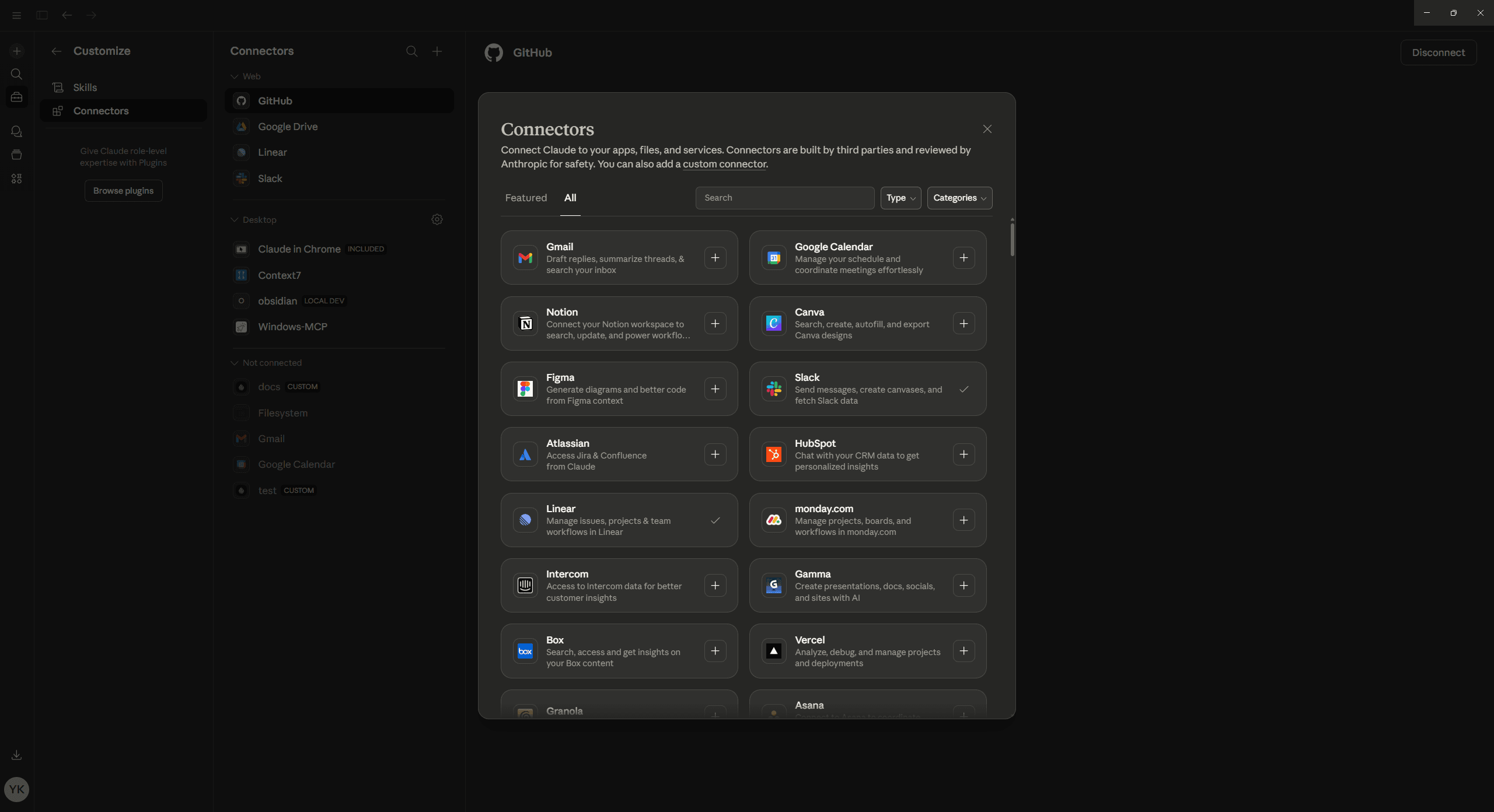
Claude Desktop: desktop extensions for local machine access
Anthropic's current local Claude Desktop MCP guide frames local MCP in Desktop around desktop extensions. These are the installable local packages that give Claude access to local files, apps, and machine resources.
So when someone says "Claude plugin" but means "the thing that lets Claude use my local tools," the more accurate 2026 term is usually desktop extension or local MCP server, not plugin.
Claude Code: MCP servers
Anthropic's current Claude Code MCP docs say Claude Code can connect to external tools and data sources through MCP and document several ways to add servers. They also document MCP resources, remote HTTP servers, and importing MCP servers from Claude Desktop.
That makes Claude Code's tool surface much more MCP-first than plugin-first.
Claude Cowork: plugins
This is where plugins are now the official term.
Anthropic's current Cowork plugins article says:
- plugins are available to paid Claude Cowork users on Pro, Max, Team, and Enterprise
- each plugin bundles skills, connectors, and sub-agents
- Cowork includes Plugin Create to help you build custom plugins
So if you mean Cowork, Claude plugins are very real.
What a Claude plugin actually is now
In Anthropic's current product language, a plugin is not just "one more tool."
A Cowork plugin is a higher-level bundle that can include:
- skills
- connectors
- sub-agents
That is different from a connector, which is mainly about access to an external service, and different from a raw MCP server, which is the protocol endpoint itself.
This is the simplest hierarchy:
flowchart TD
  a["MCP server"] --> b["Connector"]
  b --> c["Cowork plugin"]
  d["Skill"] --> c
  e["Sub-agent"] --> c
That diagram is conceptual, not a literal packaging requirement in every case, but it is the cleanest way to understand why the terms keep getting mixed up.
Where plugins live today
Plugins currently live in Claude Cowork, not as a universal Claude-wide "plugin store" concept.
Anthropic's current Cowork availability article and get started with Cowork guide describe Cowork as a paid Claude Desktop experience for agentic work on your computer. The current help docs still describe it as a research preview on paid plans.
That means:
- if you are in standard Claude chat, you are mostly looking at connectors
- if you are in Cowork, plugins become the right term
Organization-managed plugins are a real platform surface now
Anthropic's current organization plugins guide shows that Team and Enterprise owners can distribute plugins through plugin marketplaces.
The same article says admins can manage plugins through:
- manual upload
- GitHub syncing
That is a meaningful shift. It means plugins are not just a local personal feature anymore. There is now a real team distribution story around them.
The mistake older explainers make
The old version of this topic usually made one strong claim:
Claude does not have plugins.
That was once directionally useful if what you really meant was "Claude does not have ChatGPT-style plugins as its main tool system." But it is too blunt in 2026.
The updated version is:
- Claude does not use plugins as the universal tool model across every surface
- Claude Cowork does have plugins
- connectors, desktop extensions, and MCP servers still matter more than the word plugin for most Claude tool work
That is the cleaner answer.
How this differs from ChatGPT
ChatGPT's product language is now organized around apps. Claude's is more split:
- connectors for service access
- desktop extensions for local Desktop access
- MCP servers for Claude Code and protocol-level integrations
- plugins for Cowork bundles
So if you are comparing the two ecosystems, do not map terms 1:1.
For that side of the world, use What Are ChatGPT Apps? and How to Add MCP Tools to ChatGPT.
What builders should do with this
If you are building for Claude, the safest product strategy is still MCP-first.
Why:
- connectors can point at MCP servers
- Claude Code is MCP-first
- local Desktop extension workflows sit adjacent to MCP
- Cowork plugins can bundle the higher-level experience around the underlying capabilities
So even though "plugin" is now a real Claude term, the durable builder mental model is still the same: build the capability cleanly at the MCP layer, then package it appropriately for the Claude surface you care about.
If you want the no-code route for that, go next to Build AI Apps Without Code. If you want the desktop setup path, go to How to Set Up MCP in Claude Desktop.
Summary
Claude plugins are real in 2026, but only if you mean Claude Cowork. Anthropic's current docs define Cowork plugins as bundles of skills, connectors, and sub-agents available on paid Cowork plans. Outside Cowork, most Claude tool access is still described through connectors, desktop extensions, and MCP servers.
So the correct modern answer is not "Claude has plugins" or "Claude has no plugins." It is: Claude has plugins in Cowork, but plugins are only one part of a broader Claude tool stack.
FAQ
Does Claude have plugins now?
Yes in Claude Cowork. Anthropic's current Cowork docs use "plugins" as a real product term for bundled workflow packages.
Are Claude plugins the same as connectors?
No. A connector is mainly about access to an external service. A Cowork plugin bundles skills, connectors, and sub-agents into one package.
Does standard Claude chat use plugins?
Usually the more accurate term there is connectors. Anthropic's broader Claude docs describe connectors as the main cross-surface mechanism for external tool access.
Does Claude Code use plugins or MCP?
Claude Code is documented primarily through MCP. Its official docs focus on connecting MCP servers, not on a general plugin catalog model.
What should I read after this?
Read How to Set Up MCP in Claude Desktop if you need the actual setup path, or MCP Client Comparison if you are deciding between Claude, Cursor, ChatGPT, VS Code, and Windsurf.
Get the Builder Brief
Weekly tactical notes on shipping ChatGPT apps, MCP integrations, and product-led distribution.